
BoldSign eSignature Software Review
Are you looking for an affordable and reliable eSignature solution? In this in-review of BoldSign, we break down key features, pricing structure, and plan comparisons to help you decide if it’s the right digital signing software for your business. From freelancers and startups to growing teams and enterprises, we analyze what each BoldSign plan offers — including free, Growth, Business, and Premium tiers — and how it compares to others in the eSignature market.
BUSINESS SOFTWAREDOCUMENT MANAGEMENTAPPLICATIONS FORM BUILDERPRODUCTIVITYTECHNOLOGY
Backyard Promo Tteam
3/3/202613 min read


BoldSign eSignature Software Comparison Table & Key Features
If you're evaluating electronic signature tools based on cost, compliance, usability, and scalability, this POST gives you a DETAIL breakdown of what you get at every price point and who each version is best suited for.
You need a fast and secure way to sign contracts, send agreements, and manage business forms without printing or scanning. BoldSign eSignature software helps you send, track, and sign documents online from any device. It supports legally binding signatures and follows major global standards, which makes it a practical choice for modern teams.
BoldSign lets you create, send, and manage legally binding digital signatures with secure tracking, templates, and automation built for businesses of all sizes.
You can use templates for repeat contracts, send bulk signature requests, add your brand colors and logo, and monitor each document in real time. Built-in audit trails and signer verification help you stay compliant and organized.
You also get flexible pricing, from a free plan with limited monthly requests to business and enterprise tiers with higher limits and API access. Whether you run a small team or manage high-volume contracts, you can choose a plan that fits your workflow and budget.
Key Takeaways
You can send and sign legally binding documents online with secure tracking and compliance features.
You can automate workflows with templates, bulk sending, branding, and API tools.
You can choose flexible pricing plans that fit individuals, teams, or high-volume businesses.
BoldSign eSignature Software vs. Other Document Signature Solutions
Feature Comparison Table
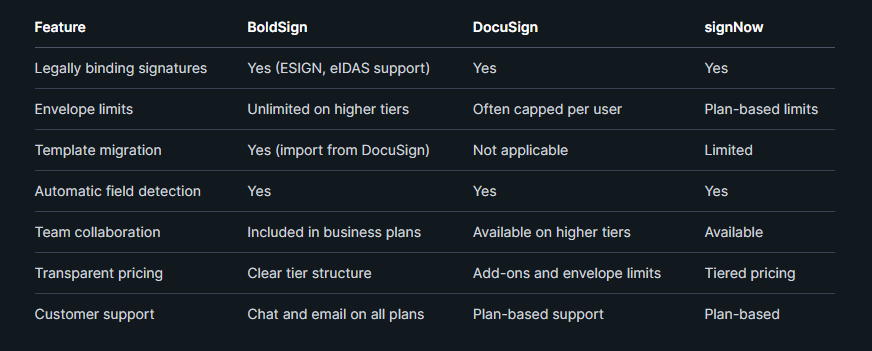
BoldSign focuses on predictable use. You can send unlimited envelopes on certain plans without per-envelope overage fees.
DocuSign remains widely adopted, but many users report strict envelope caps and higher costs. signNow offers solid core features, yet some advanced controls depend on higher tiers.
BoldSign reviews often mention ease of use and cost control as key strengths. If you run a small or mid-size team, these factors may matter more than brand name.
Pricing Overview
BoldSign pricing follows a tiered model that scales from basic to enterprise use. You can start with lower-cost plans and move up as your volume grows.
Some BoldSign plans include unlimited envelopes per user. In contrast, DocuSign often limits users to a set number of envelopes per year unless you upgrade or pay overages.
Public comparisons show that switching from certain DocuSign business plans to BoldSign business tiers can reduce annual per-user costs. Pricing depends on billing cycle and feature needs.
signNow and Adobe Acrobat Sign also use tiered pricing. However, advanced features such as API access, branding, or higher sending limits often require mid- or high-level plans.
If you value transparent pricing with fewer usage surprises, BoldSign positions itself as a cost-focused option. Always review the current plan details before you decide.
Integration Capabilities
Modern businesses need more than basic signing. You likely want your document signature software to connect with your CRM, HR tools, or internal apps.
BoldSign integrations include API access for embedded signing and automated workflows. You can upload documents, assign fields, send for signature, and track status through API calls.
Enterprise plans support webhooks and custom workflows. This setup works well if you build signing into your product or website.
DocuSign also offers strong API tools, but access and volume may depend on plan level and contract terms. signNow provides integrations as well, though advanced automation can require higher tiers.
If you plan to automate high-volume contracts or build embedded signing into your system, review API limits, documentation quality, and support access before you choose a platform
BoldSign competes with tools like DocuSign, signNow, Adobe Acrobat Sign, and PandaDoc in the document signature software market. You should compare features, pricing limits, and integration options before you choose a signature platform for your business.
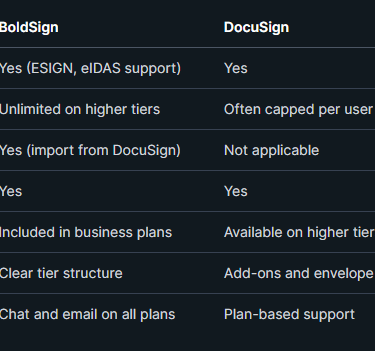
You need clear details when you compare electronic signature software. The table below highlights practical differences that affect daily use.
You manage contracts, HR forms, and sales agreements every day. A clear document signing workflow helps you send signature requests fast, reuse templates, and track every step with a full audit trail.
How to Send Signature Requests
You start by uploading your document or selecting a saved template. BoldSign supports common file types like PDF and lets you prepare a business signing form in minutes.
Use AI-powered field detection to place signature, date, and text fields automatically. You can adjust fields, assign them to each signer, and set the signing order for a structured signature workflow.
Add signer details such as name and email. You can also enable reminders and set expiration dates to keep document signing on schedule.
Before you send signature requests, review branding options like your logo and email message. Then send the request by email or generate secure signature links that you can share directly.
You can manage all sent documents from a central dashboard. This improves document management and reduces manual follow-ups.
Managing Templates and Bulk Signatures
Templates help you avoid repeating the same setup steps. You can create unlimited templates on higher plans and reuse them for contracts, NDAs, or onboarding forms.
Each template stores:
Pre-set fields and signer roles
Signing order rules
Custom branding
Standard email messages
When you need to send the same document to many people, use bulk send. Upload a CSV file with recipient details, and the system sends separate signature requests automatically.
For public forms, you can create bulk links or reusable signature links. This works well for waivers, event forms, or vendor agreements.
Team management features let you control who can create templates, send esignatures, or access completed documents. This keeps your document workflows organized and secure.
Tracking and Audit Trails
You need clear records for compliance and internal control. Every completed e-signature includes a detailed audit trail.
Audit trails record:
Signer names and email addresses
IP address and time stamps
Document actions such as viewed, signed, or declined
You can track document status in real time. The dashboard shows whether a signature request is sent, viewed, completed, or expired.
Automatic reminders reduce delays. If a signer does not act, the system sends follow-ups based on your schedule.
These records support legal standards like the ESIGN Act and eIDAS. With secure storage and a full history of actions, you maintain accountability across your entire signature workflow..
Document Signing Workflow for Businesses


Security, Compliance, and Legally Binding Signatures
You need more than a simple e-sign tool. You need strong authentication, clear legal compliance, and proven data protection. BoldSign focuses on verified signers, global regulations, and encrypted document handling.
Authentication and Verification Methods
You control how signers prove their identity. BoldSign supports email verification, access codes, and advanced signer verification options for higher-risk documents.
For sensitive agreements, you can add:
ID verification
SMS-based authentication
Facial recognition (on supported plans)
Secure access links with expiration dates
These steps reduce fraud and confirm that the right person signs your document.
Every document also includes a detailed audit trail. The audit trail records timestamps, IP addresses, and signer actions. This record helps you prove that the signature process followed proper steps.
BoldSign supports both electronic signatures (e-signatures) and digital signatures. Digital signatures use cryptographic methods to link the signer to the document. This adds another layer of trust for legal or regulated industries.

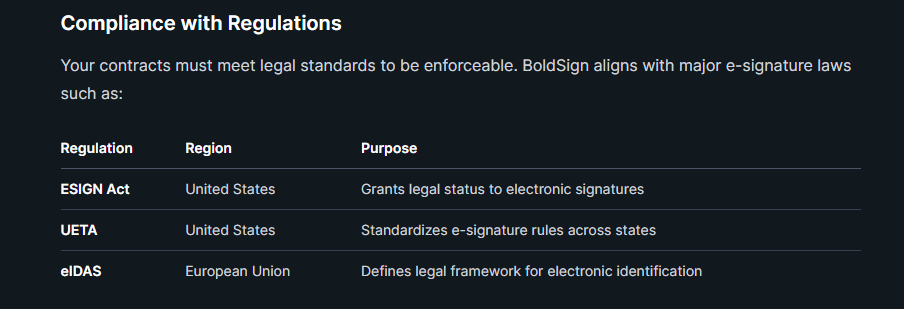
These laws recognize legally binding signatures when you follow required steps, such as consent and proper record keeping.
BoldSign also meets major compliance standards, including:
SOC 2
GDPR
HIPAA
PCI DSS
SOC 2 focuses on security controls. GDPR protects personal data in the EU. HIPAA supports healthcare data privacy. PCI DSS applies to payment card information.
This coverage helps you use BoldSign in industries like healthcare, finance, HR, and legal services.
Security Features and Encryption
You need strong encryption to protect documents from start to finish. BoldSign uses AES-256 encryption to secure data at rest. It also protects data in transit using secure protocols.
AES-256 is a widely accepted encryption standard. Many banks and government systems use it.
BoldSign applies strict access controls. Only authorized users can view or manage documents. Role-based permissions limit what each user can do.
Regular security audits and monitoring support system reliability. These checks help detect risks early and maintain compliance standards like SOC 2.
With encryption, authentication tools, and compliance coverage, you can send and sign business forms with confidence.
Compliance with Regulations
Your contracts must meet legal standards to be enforceable. BoldSign aligns with major e-signature laws such as:
Customization and Branding Options
BoldSign lets you control how your documents look and how recipients interact with them. You can apply custom branding, multiple brands, templates, and workflow automation to create a consistent and efficient signing experience.
Custom Branding and Multiple Brands
You can customize signature request emails and signing pages with your own logo, brand colors, and company name. This keeps your documents aligned with your visual identity instead of using a generic layout.
Account administrators can create a new brand profile from the settings menu. When you set up a brand, you can:
Upload a company logo
Select primary and accent colors
Set a custom “From” name for emails
Preview changes before saving
If you manage more than one product line or business unit, you can create multiple brands within the same account. You then select the right brand at the document level before sending it.
This setup works well for agencies, franchises, and companies with regional teams. It keeps each client or department visually distinct while using one central eSignature system.
Personalizing the Signing Experience
Branding does more than change colors. It shapes how recipients view and trust your documents.
You can tailor the full signing experience, including branded emails and customized signing pages. This helps recipients recognize your company immediately when they open a request.
BoldSign also supports customizable templates. You can save frequently used contracts or business signing forms and reuse them. Templates can include:
Pre-filled text
Assigned signer roles
Pre-placed form fields
Standard instructions
This reduces setup time and keeps documents consistent across your team. You can also track document status in real time, send reminders, and access detailed audit trails.
When recipients see clear branding, structured forms, and simple instructions, they can complete the signing process faster and with fewer errors.
Workflow Automation
Workflow automation helps you move documents through the signing process with less manual work.
You can create structured signing flows by setting the order of recipients. For example, a contract can go to a manager first, then to a client. This keeps approvals organized and prevents confusion.
Templates also support automation. Once you define signer roles and fields, your team can send documents in a few clicks. Higher-tier plans support bulk sending, which lets you send the same document to many recipients at once.
You can also configure reminders and expiration dates. This reduces delays and helps you keep deals on track.
By combining branding, templates, and automated workflows, you create a consistent and repeatable signing process that fits your business needs.
Integrations, API, and Developer Features
BoldSign gives you tools to connect eSignature workflows directly to your systems. You can use its REST API, SDKs, webhooks, and embedded signing features to automate document signing across web, mobile, and cloud platforms.
API Integration and SDKs
BoldSign offers a REST API that lets you send, sign, track, and manage documents from your own application. You can create signature requests, check status, download signed files, and access audit trails through secure API calls.
You authenticate requests using API keys or OAuth 2.0, depending on your setup. The platform also provides a sandbox environment, so you can test your integration before you move to production.
BoldSign supports multiple SDKs to speed up development. These SDKs reduce the need to write raw HTTP requests and help you handle authentication, document uploads, and signer management more easily.
You can also use webhooks to receive real-time updates. For example, your system can trigger actions when a document is viewed, signed, or completed. This helps you automate workflows in CRM, HR, or sales systems without manual tracking.
Embedded Signing and Platform Embedding
With embedded signing, you keep users inside your app during the signing process. Instead of redirecting them to an external page, you generate a secure signing link and display it within your platform.
This setup works well for SaaS platforms, client portals, and internal business tools. Your users can review and sign documents without leaving your interface.
You can also embed document sending. This allows customers to upload files, add signers, and start signature requests directly from your app. It creates a smoother experience and reduces drop-off.
For businesses that need branded workflows, BoldSign supports custom logos, colors, and messaging. Combined with embedded signing, this helps you maintain a consistent user experience while managing contracts, onboarding forms, or service agreements.
Mobile App and Cloud Integrations
BoldSign supports mobile-friendly signing, which allows you and your clients to sign documents on smartphones and tablets. This works through responsive web pages and dedicated mobile apps on iOS and Android.
You can send signature requests by email and, in some plans, through SMS or WhatsApp signature requests. This helps you reach signers quickly, especially in sales or field operations.
The platform also connects with common business tools through integrations and automation workflows. You can link it with CRM systems, cloud storage services, and other SaaS tools to store signed documents automatically.
When you combine mobile access, cloud storage, and API automation, you create a signing process that fits into your existing systems instead of forcing you to change them.
Getting Started with BoldSign
BoldSign gives you a clear path to send and sign documents online without paper or in-person meetings. You can test the software, choose a plan that fits your needs, and get help during setup through guided support and demos.
Free Trial and Plans
You can start with a 30-day free trial to test core BoldSign features before you pay. The trial lets you send signature requests, create templates, track document status, and review audit trails. This helps you see how the system works in real business tasks such as HR forms, sales contracts, or vendor agreements.
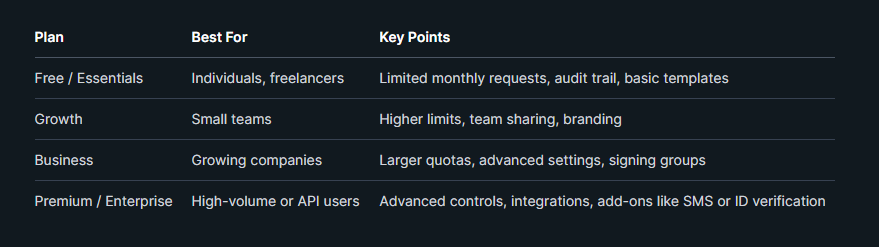
BoldSign also offers a Free plan with limited signature requests each month. Paid plans increase your monthly limits and unlock more team tools.
Below is a simple plan overview (pricing may vary by billing cycle):
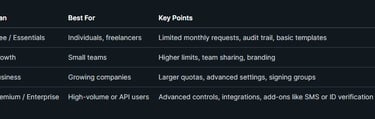
If you build or test integrations, you can request access to a sandbox environment. This lets you test APIs and workflows without affecting live documents.
Onboarding and Customer Support
You can set up your account in minutes. After signup, you add your name, email, and signature style. You can draw, type, or upload your signature.
The dashboard guides you through sending your first document. You upload a file, add signers, place form fields, and click send. The system tracks views and signatures in real time.
BoldSign provides several support options:
Help Center with step-by-step articles
Interactive self-help demos
Email or portal-based customer support
Personalized demos for businesses
If you manage a team, admins can control user roles, document settings, and security options like two-step authentication. This structure helps you stay compliant and keep document access secure.
You can rely on built-in reminders, status tracking, and audit logs to manage your signing process from start to finish.
Frequently Asked Questions
BoldSign focuses on legal compliance, business-ready features, API access, flexible pricing, and secure document handling. The details below explain how the platform supports enforceable eSignatures, team workflows, and technical integration.
How does BoldSign ensure the legal enforceability of its eSignatures?
BoldSign supports major eSignature laws such as the ESIGN Act and UETA in the United States and eIDAS in the European Union. These laws give electronic signatures the same legal weight as handwritten signatures when certain conditions are met.
The platform records signer intent, captures consent, and creates a detailed audit trail for each document. The audit trail logs timestamps, IP addresses, and document activity.
BoldSign also uses encryption and secure infrastructure to protect document integrity. These controls help you prove that no one altered the document after signing.
What features does BoldSign offer for business document signing needs?
BoldSign allows you to send legally binding eSignatures for contracts, HR forms, sales agreements, financial documents, and compliance records. You can upload common file types such as PDF and add signature fields, initials, dates, text boxes, and checkboxes.
You can create reusable templates to speed up repeat workflows. Bulk sending lets you send the same document to many recipients at once.
The platform supports signing order, automated reminders, and real-time status tracking. You also get branding options, mobile apps for iOS and Android, and a dashboard that tracks all document activity.
Higher-tier plans include unlimited signature requests, team management tools, and advanced authentication options.
Can BoldSign integrate with other applications through its API?
BoldSign offers API access for businesses that need embedded signing or automated workflows. You can connect it to your website, CRM, HR system, or internal software.
The API allows you to send documents, track status, manage templates, and collect signatures directly inside your own application. This setup helps you reduce manual work and keep users inside your system.
Enterprise plans also support advanced automation and high-volume use cases.
What are the pricing options available for using BoldSign's API?
BoldSign provides several pricing tiers, including Free, Growth, Business, Premium, and Enterprise plans.
API access and embedded signing features are typically available under Enterprise or custom API plans. These plans use custom pricing based on volume and integration needs.
Lower tiers focus on individual users and small teams. If you need automation or large-scale integration, you will likely need a custom or enterprise-level agreement.
Does BoldSign provide a way to compress PDFs as part of its service?
BoldSign focuses on document signing, tracking, and management. It does not position PDF compression as a core eSignature feature.
However, documents must meet file size limits before upload. You may need to compress large PDFs using a separate PDF tool before sending them for signature.
BoldSign does support secure document handling and offers related tools such as watermark options in certain workflows.
What are some free alternatives to BoldSign for eSignature requirements?
You can use BoldSign’s Free/Essentials plan, which allows up to 25 signature requests per month at no cost.
Other platforms also offer limited free plans, such as DocuSign and PandaDoc, though they often restrict the number of envelopes or features. Many free tools limit branding, templates, or advanced authentication.
If you only need occasional signatures, a free tier may work. If you handle frequent or business-critical documents, a paid plan usually provides stronger tracking, compliance support, and team features.Write your text here...
FAQs
What is UETA?
UETA grants legal status to electronic signatures in the United States.
How does EIDAS work?
EIDAS sets the legal framework for electronic identification across the European Union.
Are e-signatures valid everywhere?
E-signature laws vary by region; UETA covers US states, while EIDAS applies in the EU.
Why use electronic signatures?
They speed up processes and reduce paper waste effectively.
Is UETA a federal law?
No, UETA is a state-level act adopted by most US states.
What benefits does EIDAS provide?
EIDAS ensures secure, standardized electronic IDs and signatures across EU countries.
backyadePromo
stay in touch
Follow On OUR OTHER Channels
your fashion weekend Aventura Dec 2025 - soon
© 2026 BACKYARD pOMO. All rights reserved.
Stay Connected
More about